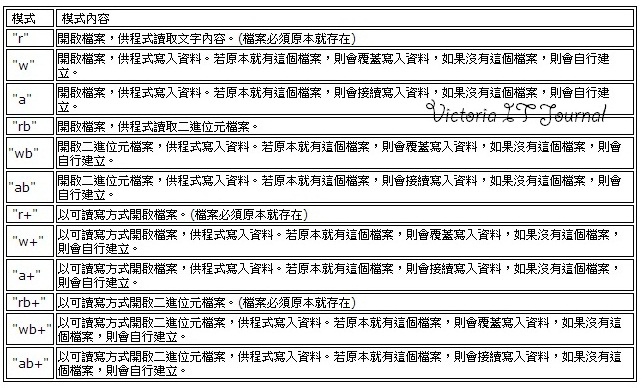
FILE* pFile;
 while (!feof(pFile)) {
  //fread 讀取
  //資料處理
 }
 //如先使用fread讀取,再來判斷feof,當feof判斷為true時就跳離loop
 while (1) {
  //fread讀取
  if (feof(pFile))
    break;
 }
測試環境 vc 2015 mfc
FILE* pFile; while (!feof(pFile)) { //fread 讀取 //資料處理 } //如先使用fread讀取,再來判斷feof,當feof判斷為true時就跳離loop while (1) { //fread讀取 if (feof(pFile)) break; }
測試環境 vc 2015 mfc
//在mfc中使用前請先至Stdafx.h 宣告定義
#define _CRT_SECURE_NO_WARNINGS
---------以下為範例--------------------------
FILE *pFile;
char cbuffer[] = { 'h','e','l' ,'l' ,'o' };
pFile = fopen("hello.txt", "w");
if (pFile == NULL)
{
 MessageBox(L"empty");
}
else
{
 fwrite(cbuffer,1, sizeof(cbuffer), pFile);
}
fclose(pFile);
測試環境:2015--mfc
參考以下:
FILE * fopen ( const char * filename, const char * mode );
----------------------使用方式-------------------------------------------
OpenPress("AAA.exe", " ");//開啟外部檔案ClosePress("AAA.exe");//關閉外部檔案
----------------------以下為函式-------------------------------------------
public static bool OpenPress(string FileName, string Arguments)//開啟外部檔案
       {
           Process pro = new Process();
           if(System.IO.File.Exists(FileName))
           {
               pro.StartInfo.FileName = FileName;
               pro.StartInfo.Arguments = Arguments;
               pro.StartInfo.CreateNoWindow = true;
               pro.StartInfo.CreateNoWindow = true;
               pro.StartInfo.UseShellExecute = false;
               pro.StartInfo.RedirectStandardInput = true;
               pro.StartInfo.RedirectStandardOutput = true;
               pro.StartInfo.CreateNoWindow = true;
               pro.Start();
               return true;
           }
           return false;
       }
public static bool ClosePress(string FileName)//關閉外部檔案
       {
           Process[] proa = Process.GetProcesses();//獲取任務管理器中所有進程
           foreach(Process p1 in proa)
           {
               try
               {
                   string processName = p1.ProcessName.ToLower().Trim();
                   if(processName == FileName)
                   {
                       p1.WaitForExit(1000);
                       p1.Kill();
                       p1.CloseMainWindow();
                   }
               }
               catch { return false; }
           }
           return true;
       }----------分隔線 說明--------------------
1.前言
透過程式控制,可在背景執行cmd.exe的命令。2.說明
程式碼,提供兩種方式執行命令://程式碼最少,但是會跳出DOS視窗,閃一下後自行關閉
System.Diagnostics.Process.Start("cmd.exe", @"/c dir");

//在背景執行,無DOS視窗閃爍問題
System.Diagnostics.Process p = new System.Diagnostics.Process();
p.StartInfo.FileName = "cmd.exe";
p.StartInfo.Arguments = @"/c dir";
p.StartInfo.UseShellExecute = false;
p.StartInfo.RedirectStandardInput = true;
p.StartInfo.RedirectStandardOutput = true;
p.StartInfo.RedirectStandardError = true;
p.StartInfo.CreateNoWindow = true;
p.Start();
// Example code
CFolderPickerDialog m_dlg;
CString m_Folder;

m_dlg.m_ofn.lpstrTitle = _T("Put your title here");
m_dlg.m_ofn.lpstrInitialDir = _T("C:\\");
if (m_dlg.DoModal() == IDOK) {
       m_Folder = m_dlg.GetPathName();   // Use this to get the selected folder name
                                         // after the dialog has closed

       // May need to add a '\' for usage in GUI and for later file saving,
       // as there is no '\' on the returned name
       m_Folder += _T("\\");
       UpdateData(FALSE);   // To show updated folder in GUI

       // Debug
       TRACE("\n%S", m_Folder);
}
// End of example
測試環境:MFC
ArrayList alWorkPoint = new ArrayList();
//System.Windows.Forms.ListView listView_CM; 宣告的Listview元件
dialog.Title = "Select file";
dialog.InitialDirectory = ".\\";
dialog.Filter = "txt files (*.*)|*.txt";
            if (dialog.ShowDialog() == DialogResult.OK)
            {
                StreamReader filer = new StreamReader((dialog.FileName));
                alWorkPoint.Clear();
                listView_CM.Items.Clear();
                string str;
                while ((str = filer.ReadLine()) != null)
                {
                    alWorkPoint.Add(str);
                }
                DecoderFileToListView();
                filer.Close();
            }
//指定檔名,讀取單一檔案
StreamReader filer = new StreamReader(("new.txt")); string str; while((str = filer.ReadLine()) != null) { MessageBox.Show(str); }測試環境:vs2015 c#.net